
OpenAI Decisions API: A Practical Guide to Typed AI Answers
How to use predicates, choices, and scores with GPT-6 Luna—and when this beta endpoint fits better than Responses.
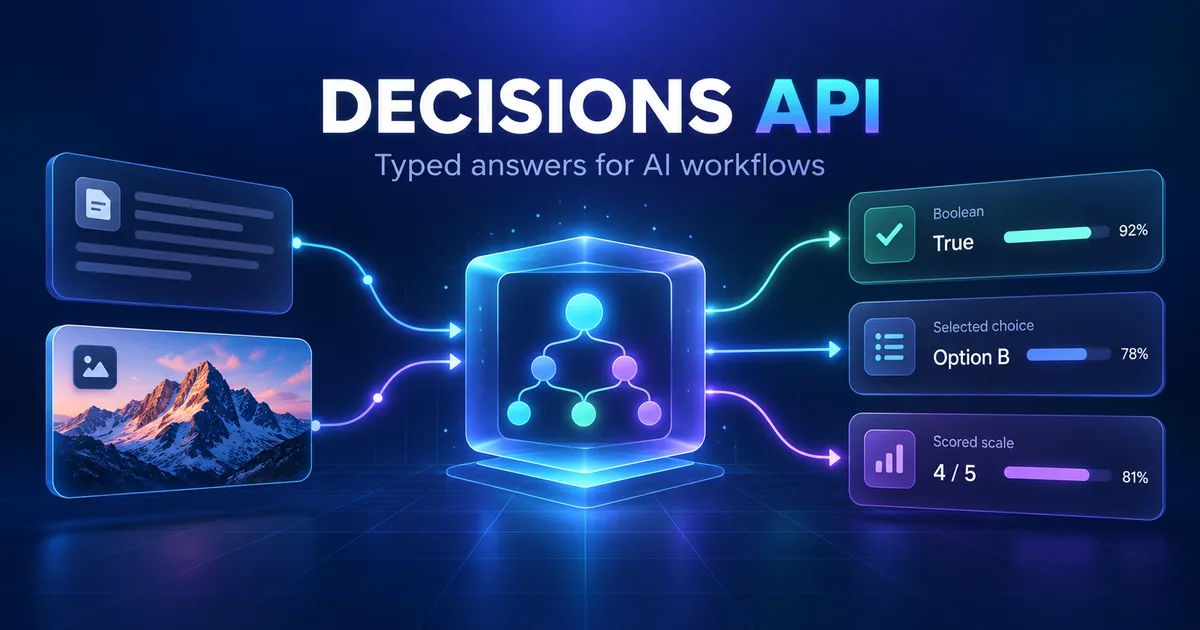
Many AI applications do not need another long-form answer. They need a small, typed decision that software can use immediately: Is this request urgent? Which queue should receive it? How strongly does an image match a quality rubric?
On October 6, 2026, OpenAI released the Decisions API in public beta. The dedicated POST /v1/decisions endpoint accepts text, images, or both and returns one or more typed answers. The first supported model is gpt-6-luna.
This guide explains what the API does, how its three question types differ, how to make a first request, and when it is a better fit than the Responses API or Structured Outputs.
Important: OpenAI describes Decisions as roughly 10 times faster than using GPT-6 Luna through the Responses API. That is an official product claim, not an independent Rubic8 benchmark. Measure latency, accuracy, and cost with your own production-like data before changing an existing workflow.
What Is the OpenAI Decisions API?
The Decisions API is a focused inference endpoint for evaluating shared evidence and returning constrained answers your application can act on. Instead of asking a model to compose prose or generate an arbitrary JSON object, you define one or more questions with known answer shapes.
A request contains three main elements:
model: currentlygpt-6-luna;input: text, image input, or user messages containing both;questions: predicate, choice, or score definitions.
The response contains an answers array, the model name, and usage information. Because each question has a defined type, application code can validate and route the result more directly than it can parse an unconstrained natural-language answer.
OpenAI lists classification, request routing, and work prioritization as representative uses. The API is in public beta, so its behavior and interface may still change before general availability.
Official sources: OpenAI API changelog and Decisions guide.
The Three Question Types
The central design decision is choosing the smallest output type that matches the job.
Predicate: estimate whether a condition is true
A predicate asks for the probability that a statement is true. It is suitable for binary conditions where a probability is more useful than a bare yes or no.
Examples include:
- Does the customer report a damaged item?
- Does this message require urgent review?
- Does the uploaded image contain a readable receipt?
The returned answer includes type: "predicate", the question name, and a probability. Your code, not the model, should apply the operating threshold. A team may route probabilities above 0.90 automatically while sending borderline cases to human review.
Choice: select from a fixed set
A choice question asks the model to select one value from options you provide. Values may be strings or booleans, and the response includes the selected choice, its confidence, and probabilities for the available options.
Good uses include selecting a support queue, choosing an allowed UI action, assigning a document type, or routing a request to a larger reasoning model.
Keep choices mutually exclusive and describe them clearly. If several options overlap, even a well-formed response may not represent a reliable business decision.
Score: evaluate against ordered levels
A score question evaluates an input against levels you define. Each level has a label and may include a description. The answer contains the selected score, confidence, and probabilities across levels.
This is useful for rubric-based evaluation such as lead quality, content risk, visual damage severity, or review priority. Make adjacent levels concrete. Labels such as “low,” “medium,” and “high” are much more useful when their descriptions explain observable differences.
A Minimal cURL Example
The following request checks whether a customer reports damage and chooses the correct workflow. Keep the API key on your server; never expose it in browser-side JavaScript.
curl https://api.openai.com/v1/decisions \
  -H "Authorization: Bearer $OPENAI_API_KEY" \
  -H "Content-Type: application/json" \
  -d '{
    "model": "gpt-6-luna",
    "input": "The package arrived today. The screen is cracked and the device will not turn on.",
    "questions": [
      {
        "type": "predicate",
        "name": "damaged",
        "instructions": "Does the customer report that the delivered item is damaged?"
      },
      {
        "type": "choice",
        "name": "route",
        "instructions": "Choose the best available support route.",
        "choices": [
          {"value": "damage_claim", "description": "A delivered product is physically damaged."},
          {"value": "technical_support", "description": "The product is intact but has a technical problem."},
          {"value": "general_support", "description": "Neither specialist route applies."}
        ]
      }
    ]
  }'
A successful response has an answers array. Do not copy sample probabilities into tests as expected production values; actual answers depend on the input, instructions, model behavior, and API version.
When inspecting a response manually, the Rubic8 JSON Formatter can make compact JSON easier to read. If you are debugging malformed test data, use the JSON Validator to separate syntax problems from API behavior.
JavaScript Example With Explicit Guardrails
The endpoint is most useful when the application validates the answer before acting on it. This server-side JavaScript example applies a confidence threshold and preserves a human-review path.
const response = await fetch("https://api.openai.com/v1/decisions", {
  method: "POST",
  headers: {
    "Authorization": `Bearer ${process.env.OPENAI_API_KEY}`,
    "Content-Type": "application/json"
  },
  body: JSON.stringify({
    model: "gpt-6-luna",
    input: ticketText,
    questions: [{
      type: "choice",
      name: "route",
      instructions: "Choose the best queue using only the ticket evidence.",
      choices: [
        { value: "billing", description: "Payments, invoices, or refunds." },
        { value: "technical", description: "Product failures or configuration." },
        { value: "account", description: "Login, identity, or account access." },
        { value: "other", description: "No specialist queue clearly applies." }
      ]
    }]
  })
});

if (!response.ok) {
  throw new Error(`Decisions API failed: ${response.status}`);
}

const data = await response.json();
const route = data.answers.find(answer => answer.name === "route");

if (!route || route.type === "refusal" || route.confidence < 0.85) {
  await sendToHumanReview(ticketText);
} else {
  await routeTicket(route.choice, ticketText);
}
The threshold is an example, not an OpenAI recommendation. Choose it from evaluation results and the cost of each error. A wrong medical, financial, security, or account action has a very different risk profile from a miscategorized newsletter.
Decisions API vs Responses API vs Structured Outputs
These tools overlap, but they solve different primary problems.
Use Decisions when the answer space is constrained
Decisions is a strong candidate when you need a probability, one value from a fixed list, or a rubric score. It is designed for fast, typed judgments over text or images.
Use Responses when the task requires generation or reasoning
The Responses API is the broader interface for generating text, using built-in tools, calling functions, and handling multi-step work. Use it when the model must explain, synthesize, plan, search, write code, or produce a result that cannot be represented by a predicate, choice, or score.
Use Structured Outputs for a custom response schema
Structured Outputs is appropriate when you need a richer JSON schema rather than the three Decisions question types. For example, extracting an invoice into nested customer, line-item, tax, and payment fields is a schema-generation task, not merely a fixed choice.
A practical architecture can combine them. Decisions can route a simple request immediately and send only complex cases to the Responses API. That is an architectural inference based on the product interfaces, not a guarantee that it will reduce cost or latency in every application.
Text and Image Inputs
The API can evaluate text, images, or both. This makes it useful for tasks such as checking whether a product photo shows visible damage and then selecting a review queue.
Image support does not remove the need for careful testing. Performance can change with lighting, crop, resolution, language, image quality, and the kinds of cases represented in an evaluation set. Do not treat confidence as proof that an answer is correct.
The API reference allows image parts in decision messages and documents request limits. Check the live reference before designing a high-volume image pipeline because beta limits can change.
Reliability Patterns for Production
Write observable instructions
Ask the model to judge evidence present in the input. “Does the message explicitly mention a refund?” is easier to evaluate than “Is this customer difficult?” Avoid instructions that rely on hidden business context.
Add an escape route
For choices, include an option such as other, unknown, or needs_review when real inputs may fall outside the predefined set. For automated actions, validate that the selected action is currently available before executing it.
Handle refusals and API errors
The documented answer union includes a refusal type. Your code should also handle timeouts, non-2xx responses, missing answers, duplicate names, and unexpected response shapes. A safe fallback is part of the product design, not an afterthought.
Calibrate thresholds with labeled examples
Build a representative evaluation set and compare answers with reviewed labels. Examine false positives and false negatives separately. A single overall accuracy number can hide the error that matters most.
Log decisions without collecting unnecessary data
Record the model, question version, selected answer, confidence, threshold outcome, latency, and final human correction where permitted. Minimize personal data and follow your retention requirements.
Version questions like code
A small wording change can alter classifications. Store question definitions in version control, test changes before rollout, and retain enough metadata to explain which version produced a decision.
Pricing, Models, and Availability
At launch on October 6, 2026, the Decisions API is in public beta and supports gpt-6-luna. OpenAI's model page describes Luna as an efficient model for focused, high-volume tasks and lists a 1,050,000-token context window and 128,000 maximum output tokens for the model generally.
Do not assume that every general Luna capability or limit applies identically to the specialized Decisions endpoint. Consult the endpoint reference and your account's current limits.
Pricing and processing tiers can change. Verify the current OpenAI API pricing page rather than copying a dollar figure into long-lived application logic. OpenAI's data-controls documentation currently lists /v1/decisions as available in supported API regions and documents regional processing in the United States and Europe.
A Practical Adoption Checklist
- Choose a narrow, reversible decision with a known fallback.
- Define whether the correct output is a predicate, choice, or score.
- Write explicit instructions and non-overlapping options or levels.
- Create a reviewed evaluation set containing normal, ambiguous, and adversarial cases.
- Measure task accuracy, class-specific errors, latency, and cost on your own data.
- Set confidence or probability thresholds based on risk.
- Send uncertain cases, refusals, and failures to a safe fallback.
- Monitor corrections and reevaluate after model or prompt changes.
Frequently Asked Questions
Is the Decisions API generally available?
No. OpenAI released it in public beta on October 6, 2026. Production teams should expect possible changes and follow the changelog.
Which model does the Decisions API use?
At launch, the only documented model is gpt-6-luna.
What outputs can it return?
You can ask predicate questions, fixed-choice questions, and rubric-based score questions. The documented response may also contain a refusal answer for a question.
Is it guaranteed to be 10 times faster?
No. “10x faster” is OpenAI's product claim comparing the specialized endpoint with GPT-6 Luna through the Responses API. Network conditions, input size, concurrency, region, and workload can affect observed latency. Benchmark your own use case.
Can it replace the Responses API?
Not for every task. Decisions is optimized for constrained judgments. Responses remains the better fit for open-ended generation, tool use, multi-step reasoning, and richer workflows.
Should a high-confidence answer trigger an irreversible action?
Confidence is not a guarantee. Use business rules, validation, permissions, rate limits, audit logs, and human approval where the cost of a mistake is significant.
Final Takeaway
The Decisions API gives developers a specialized path from unstructured evidence to typed application decisions. Its main advantage is not that it produces more content; it narrows the output to a probability, a fixed choice, or a score.
That makes it promising for routing, classification, prioritization, and lightweight multimodal checks. The right first project is small, measurable, and reversible. Treat the beta label and performance claims carefully, evaluate with real examples, and keep a safe fallback whenever a model answer can cause an external action.
Official OpenAI Sources
- OpenAI API changelog
- Decisions API guide
- Create a decision API reference
- GPT-6 Luna model documentation
- Structured Outputs guide
- OpenAI API data controls
Rubic8 Editorial Team
Editorial Team
Rubic8 creates practical guides and free tools for developers, webmasters, and digital publishers. Our fast-changing technical content is reviewed against current primary documentation before publication.
