
GitHub Copilot Cloud Sandbox Billing: Rates, Budgets and Cost Examples
What changes on November 23, 2026: GitHub cloud sandbox pricing, shared Actions compute, owner accounts, and hard-spend controls
November 23, 2026 is an important date for developers using GitHub Copilot in the cloud. GitHub says billing for Copilot cloud sandbox usage begins on this date, after an October 28 rollout of its connected Copilot cloud experience and a November 19 clarification of the billing start date.
The headline is easy to misunderstand. GitHub is not announcing that every Copilot chat suddenly has the same new per-minute fee. The new usage meters apply to cloud sandbox resources: compute while a session runs, memory allocated while it runs, and storage for snapshots retained after a session stops. Eligible usage can draw from the same dollar-denominated monthly compute allowance as GitHub Actions. That distinction matters for an individual developer who uses Copilot from a laptop, and even more for teams running several coding agents in parallel.
This guide explains the official rates, shows a reproducible cost calculation, walks through account ownership and budget controls, compares Cloud with Actions and local environments, and provides a practical checklist to avoid billing surprises. The examples are illustrative calculations from GitHub's published rates—not measured bills from Rubic8 or predictions about a specific account.

What changed on November 23, 2026?
GitHub announced a connected Copilot experience across web, mobile, CLI, the Copilot app and supported IDEs on October 28. Its announcement says billing for cloud sandbox usage starts November 23, 2026. GitHub added that specific date in an editor's note on November 19. The new cloud experience is available to paid Copilot plans, subject to organizational policies. Copilot Free users can continue using the older Copilot Chat experience, but should not assume access to these paid-plan cloud sessions.
In the connected experience, the session is the conversation and work history, while the environment is where the agent actually executes commands. A cloud sandbox is a GitHub-hosted, isolated Linux environment. Its work can be resumed across supported clients, and the local laptop does not need to perform the CPU-heavy work.
Primary source: GitHub Changelog: Work from anywhere with a connected Copilot cloud experience (published October 28, updated November 19, 2026).
The three cloud sandbox billing meters
GitHub's billing documentation specifies three distinct meters. The meter matters more than the headline phrase “Copilot cloud.”
| Meter | What is measured | Published rate (USD) | When it applies |
|---|---|---|---|
| Compute | vCPU-seconds | $0.000024 per vCPU-second | While the cloud sandbox runs |
| Memory | Allocated GiB-seconds | $0.000003 per GiB-second | While the cloud sandbox runs |
| Storage | Snapshot GiB-months | $0.005 per GiB-month | While a stopped session's snapshot is retained |
These are the rates listed in the official GitHub billing documentation, reviewed November 23, 2026. Always verify that page before using the rates in a purchasing or budget decision.
Compute is based on provisioned CPU time
A sandbox with two virtual CPUs running for ten minutes consumes 2 × 600 = 1,200 vCPU-seconds. Compute time stops accumulating when the sandbox is stopped; simply leaving a resumable snapshot is not the same as continuing to run the machine.
Memory is allocated memory, not peak usage
The memory meter is based on the GiB allocated to the running sandbox, not just the GiB your test suite happens to consume. A session that has 4 GiB allocated for ten minutes uses 4 × 600 = 2,400 GiB-seconds for billing purposes.
Stopped sandboxes may still have storage costs
When you stop a cloud session, GitHub can retain a snapshot so the session resumes later. While stopped, compute and memory are not metered, but retained snapshot storage is. Delete an unnecessary session rather than assuming that “stopped” means zero cost forever.
Worked example: what does a 30-minute Copilot session cost?
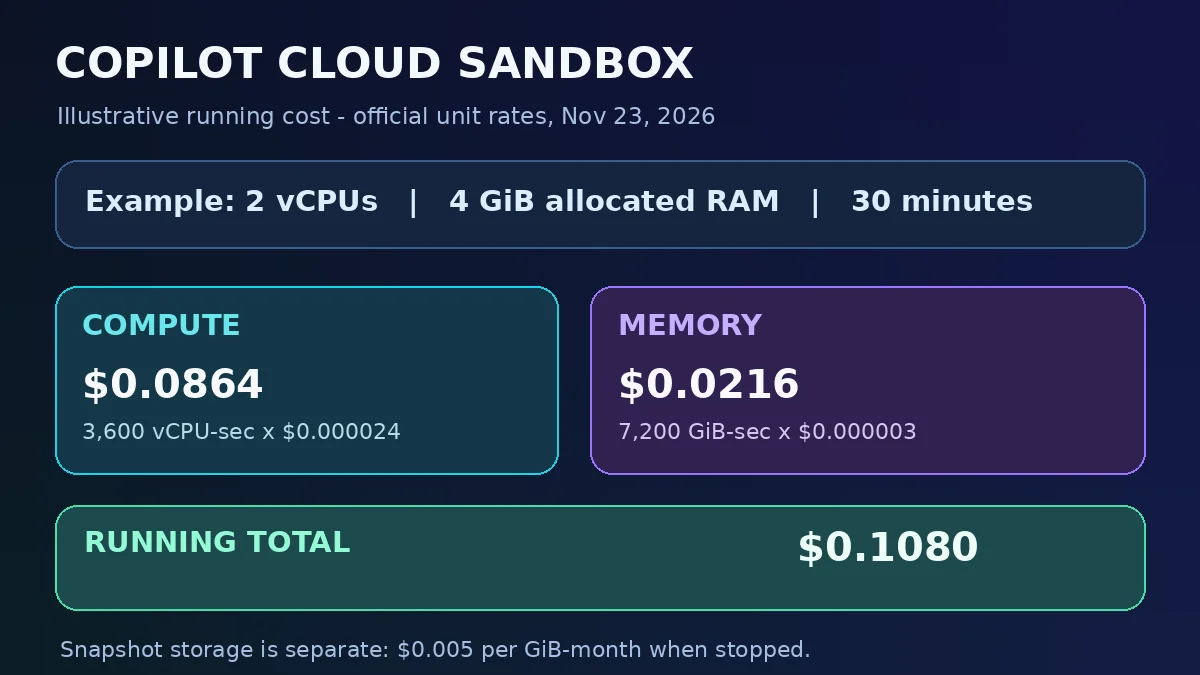
Assume the following hypothetical session: two vCPUs, four GiB of allocated RAM, and 30 minutes of running time. These are example inputs; your actual sandbox allocation and duration may differ.
| Line item | Calculation | Cost |
|---|---|---|
| CPU | 2 vCPUs × 1,800 seconds × $0.000024 | $0.0864 |
| Memory | 4 GiB × 1,800 seconds × $0.000003 | $0.0216 |
| Running total | CPU + memory | $0.1080 |
Ten identical sessions would use $1.08 of the relevant monetary compute allowance, before snapshot storage. In practice, you must also consider competing GitHub Actions use in the same account, possible changes in session size, and whether a billing period has crossed its included threshold.
The cost formula
running_cost_usd =
    (vcpus * running_seconds * 0.000024)
  + (allocated_gib * running_seconds * 0.000003)

snapshot_cost_usd =
    retained_snapshot_gib_months * 0.005
For partial snapshot retention periods, calculate the GiB-months according to the billing provider's reported usage rather than guessing a fixed 30-day month. The snapshot meter is separate from the CPU/RAM example above.
PHP example: estimate sandbox compute and memory
For a Laravel or PHP application that tracks agent jobs, the following plain PHP function estimates the running component from the published unit rates. It deliberately does not claim to reproduce GitHub's bill or its snapshot proration.
<?php
function estimateSandboxRun(
    float $vcpus,
    float $allocatedGiB,
    int $runningSeconds
): array {
    if ($vcpus <= 0 || $allocatedGiB <= 0 || $runningSeconds < 0) {
        throw new InvalidArgumentException('Invalid resource values');
    }

    // Published GitHub cloud-sandbox rates, checked Nov 23, 2026.
    $compute = $vcpus * $runningSeconds * 0.000024;
    $memory = $allocatedGiB * $runningSeconds * 0.000003;

    return [
        'compute_usd' => round($compute, 6),
        'memory_usd'  => round($memory, 6),
        'running_usd' => round($compute + $memory, 6),
    ];
}

print_r(estimateSandboxRun(2, 4, 1800));
// compute_usd: 0.0864
// memory_usd:  0.0216
// running_usd: 0.108
In a real dashboard, record session IDs, selected environment, owner account, start/stop timestamps, and the allocated resource values if your usage data exposes them. Avoid presenting a local estimate as an official GitHub invoice. For JSON inspection while building reporting tools, Rubic8 offers a JSON Formatter and JSON Validator.
Shared monthly compute allowance: why GitHub Actions matters
The new model uses a shared dollar-based compute allowance across eligible GitHub Actions usage and cloud sandbox CPU/memory usage. It is not an isolated “free Copilot sandbox hours” pool. GitHub says no eligible usage type has priority when consuming that shared amount.
| GitHub account plan | Included compute per month |
|---|---|
| GitHub Free (personal) | $12 |
| GitHub Pro | $18 |
| GitHub Free for organizations | $12 |
| GitHub Team | $18 |
| GitHub Enterprise Cloud | $300 |
These are GitHub account plan allowances, not Copilot license prices or a promise that GitHub Free accounts can start the new paid-Copilot cloud experience. The allowance includes eligible standard GitHub-hosted runner use for private or internal repositories, plus cloud sandbox compute/memory. GitHub also includes eligible larger runners for Team and Enterprise Cloud billing accounts. Standard GitHub-hosted runners for public repositories and self-hosted runners remain free independently under the conditions GitHub documents.
Official plan reference: GitHub: Product usage included with each plan.
A shared allowance example
Suppose your account has a $18 monthly compute allowance. If eligible private-repository Actions jobs consume $13 during the cycle, only $5 of the same allowance remains for eligible cloud sandbox compute/memory and any other eligible metered compute. Running more agents does not create another $18 pool. After the included amount is used, applicable overage is charged according to the account's payment and budget configuration.
Cloud sandbox billing is separate from bundled AI credits
This is arguably the most important cost-control detail in the update. GitHub explicitly states that Copilot cloud sandboxes are not part of the Bundled AI credits budget type. Bundled AI credits apply to other AI-credit-consuming SKUs, while cloud sandbox compute and storage use their own metering model.
Consequently, an organization can have a carefully configured AI-credit limit and still need a separate cloud sandbox spending guardrail. Treat model usage and execution infrastructure as distinct cost categories, even when one Copilot workflow uses both.
Set a cloud sandbox budget that can actually stop overage
GitHub's personal account budget flow is documented under Settings → Billing → Budgets and alerts → New budget. Organization and enterprise administrators manage budgets through their Billing & Licensing section.
- Open the billing account that actually owns your cloud sessions, not just the user account that launched them.
- Go to Budgets and alerts, then choose New budget.
- Select a Product-level budget for cloud sandbox spend or a SKU-level budget for the appropriate sandbox SKU.
- Choose the correct account, organization, or repository scope supported by your plan.
- Set the amount you are prepared to spend.
- Enable Stop usage when budget limit is reached where available if your goal is a hard cutoff.
- Enable threshold alerts and verify who receives them.
- Review the actual usage view after the first few sessions.
Do not use only a Bundled AI credits budget as the protection for cloud sandbox compute. Also, an alert-only budget is not a hard limit: GitHub says that without the stop-usage setting, email alerts can occur while additional usage continues.
GitHub's documentation explains that an account without a valid payment method cannot continue past its applicable included quota. Accounts with a valid payment method should configure budgets intentionally rather than relying on the absence of payment details as a long-term process.
Official how-to: GitHub: Setting up budgets for metered products.
Who gets billed when an agent touches several repositories?
Cloud sessions can span multiple repositories belonging to the same owner. GitHub says sandbox usage is billed to the account that owns the sandbox. For repository-connected sessions, that is the repository owner (personal account or organization). For a session without a repository, the chosen owner is billed; if no owner is chosen, the personal account is billed.
This matters for developers contributing to several organizations, consultants helping multiple clients, and team members who launch a session from a personal workspace.
- Confirm the intended owner before beginning a long or parallel session.
- Review billing authorization and organization policies before running sessions against client repositories.
- Do not infer the billable account from which device or IDE launched the prompt.
- Reconcile expenses at the account that owns the sandbox.
Cloud vs GitHub Actions vs local sandboxing
GitHub Copilot offers multiple execution environments. They are not interchangeable simply because all can assist with code.
| Environment | Where work executes | Why choose it | Key cost/constraint |
|---|---|---|---|
| Cloud sandbox | GitHub-hosted isolated Linux environment | Resumable cross-client sessions; cross-repo tasks | CPU, RAM and snapshot storage meters |
| GitHub Actions-based session | GitHub Actions runner | Custom runner, setup steps, OIDC and Windows workflows | Actions runner billing; eligible usage shares compute allowance |
| Local sandboxing | Developer's own machine with restrictions | Keep execution local and constrain access | No additional GitHub local-sandboxing fee; local hardware and other service costs still apply |
GitHub documents that the Cloud environment is generally the default where Cloud and Actions can be chosen. The environment selection is made at session start; changing it requires a new session. In Copilot CLI, local execution is the default, while the documented interactive flag for cloud execution is copilot --cloud. GitHub specifies that this flag is not combinable with non-interactive -p or -i modes.
The Rubic8 local sandboxing guide covers local execution restrictions. If you use GitHub Agentic Workflows, also read the agentic workflows setup guide; Actions-driven workflows are a different operational and billing path from a resumable cloud sandbox.
Five hidden cost drivers to watch
1. Several parallel sessions
A single inexpensive session may hide the combined cost of ten concurrently running agent sessions. Track session concurrency and owner-account usage instead of focusing only on the price of one example task.
2. Leaving idle sessions running
Compute and allocated-memory meters track the running sandbox. An idle but running environment is not necessarily a zero-cost environment. Stop a session when you do not need it actively running.
3. Retained snapshots you never resume
A stopped environment no longer accrues running CPU/RAM usage, but its saved snapshot can incur storage cost until deleted. Include snapshot cleanup in lifecycle management.
4. GitHub Actions jobs consuming the same allowance
Cloud sandbox usage and eligible private-repository Actions compute share the same pool. An increase in CI build activity can reduce headroom for agent sessions without any change in agent behavior.
5. Billing the wrong organization
The session owner matters. A contractor who launches work in the wrong account may consume a personal allowance or create an unexpected charge even when the code lives in an approved organization repository.
A practical preflight checklist for November 23
Use this checklist before enabling cloud sessions broadly:
- Inventory the workload: Identify which agents truly need cross-client, resumable cloud execution.
- Confirm paid Copilot eligibility: Review the user's plan and the organization's cloud policy.
- Confirm the billable owner: Personal account vs organization.
- Read current GitHub rates: Check compute, memory, and snapshot storage meters.
- Check the shared Actions balance: Review other eligible compute usage in the current billing period.
- Set the right budget: Product-level or SKU-level, not just bundled AI credits.
- Enable the stop rule if needed: Budget alerts alone do not guarantee a hard stop.
- Run one controlled pilot: Record start time, stop time, apparent resource allocation, and measured GitHub usage.
- Clean up snapshots: Keep only the sessions you actually intend to resume.
- Compare outcomes: Measure cost per completed and reviewed code task, not only cost per active minute.
Should you move every coding agent to the cloud?
No. GitHub's cross-client session continuity is useful, but that feature alone does not make a cloud sandbox the best execution environment for every project.
Cloud is compelling for a long-running cross-repository investigation, a task that continues while you switch from desktop to mobile, or an agent workload that should not use local CPU. Actions may be better for repositories that need Windows runners, specific setup steps or an established CI pipeline. Local execution may be preferable for smaller tasks when you want to keep code execution on your own machine and avoid a GitHub-hosted cloud sandbox meter.
The cost question is therefore not only “Which rate is cheaper?” It is “Which environment completes the task correctly, with the right permissions and review controls, at an acceptable total cost?” That requires measuring completion quality, environment usage and human review time—not assuming the same task behaves identically in all three environments.
Frequently asked questions
Does every GitHub Copilot user pay a new fee on November 23?
No. The announcement concerns billed cloud sandbox usage. Eligibility, included compute, owner account and budgets determine whether a user incurs overage. Copilot Free does not automatically gain access to the new paid-plan cloud experience.
Do stopped sessions still cost money?
CPU and allocated RAM are not metered while stopped, but a retained snapshot may incur storage cost until the sandbox is deleted.
Does a Copilot AI-credit budget cap cloud sandbox compute?
No. GitHub expressly says cloud sandboxes are not included in the Bundled AI credits budget type. Use a supported cloud-sandbox Product-level or SKU-level budget.
Do cloud sandboxes use GitHub Actions minutes?
GitHub now expresses the relevant included compute allowance as a shared monetary amount rather than a fixed runner-minute pool. Eligible Actions runner compute and sandbox CPU/memory draw against the same dollar-denominated allowance at their individual rates.
Is local sandboxing billed at the same rate?
No. GitHub's billing documentation says local sandboxing is included in a standard Copilot seat at no additional sandboxing charge. Local machine, electricity, or other cloud service costs remain outside that claim.
What happens when the included allowance runs out?
GitHub says additional eligible usage is billed according to your payment and budgets. Without a valid payment method, use is blocked when the applicable quota is exhausted. A correctly configured hard budget can also stop further usage.
Bottom line
November 23 marks the announced start of Copilot cloud sandbox billing. The practical impact is broader than a price list: cloud CPU and allocated RAM now draw from a shared account-level compute allowance alongside eligible GitHub Actions workloads, while stopped-session snapshots have their own storage meter. Budgets for AI credits do not automatically control sandbox compute spending.
Before running many parallel coding agents, inspect the owner account, confirm environment choice, apply the correct budget, run a small measured pilot, and delete snapshots you no longer need. That is a more dependable cost strategy than treating cloud execution as an invisible extension of an IDE subscription.
Rates and product behavior reviewed November 23, 2026. This article uses official GitHub documentation and a clearly labeled example calculation; actual invoices and session configurations may vary.
Official references
- GitHub Changelog: Connected Copilot cloud experience, updated November 19
- GitHub Docs: Billing for cloud and local sandboxes
- GitHub Docs: Product usage included with each plan
- GitHub Docs: Set up budgets
- GitHub Docs: About cloud sandboxes
- GitHub Docs: Copilot on GitHub.com and Mobile
Rubic8 Editorial Team
Editorial Team
Rubic8 creates practical guides and free tools for developers, webmasters, and digital publishers. Our fast-changing technical content is reviewed against current primary documentation before publication.
