
Google Search Console API: Branded, Multimodal & Country Filters
Working JSON and PHP/Laravel examples for Google’s November 2026 Search Analytics API changes
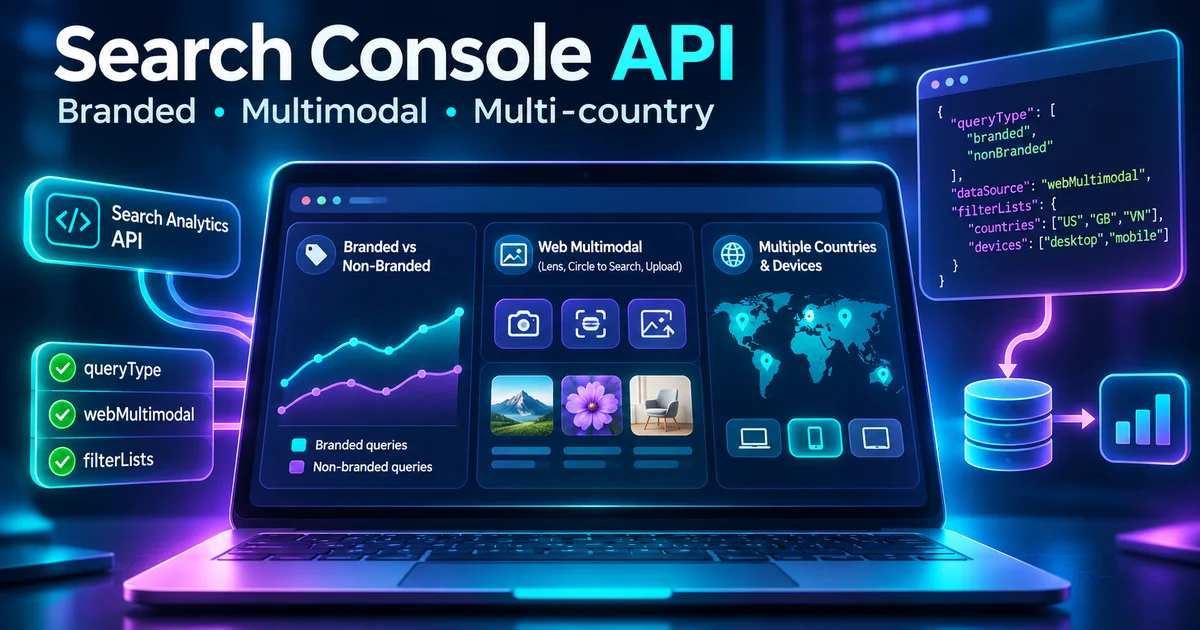
On November 16, 2026, Google shipped three practical upgrades to the Search Console Search Analytics API: first-party branded versus non-branded query classification, web multimodal search reporting, and multi-country and multi-device filters in one request. These changes turn several manual Search Console reporting steps into repeatable API workflows.
For a developer building an SEO dashboard, the opportunity is concrete: instead of approximating brand traffic with a long regular expression or running individual queries for every target country, you can ask Google for its classification and combine selected dimensions with supported filter lists. For teams monitoring image discovery, the webMultimodal search type brings Google Lens and related visual-search metrics into API automation.
This guide focuses on correct request shapes, PHP/Laravel integration, response interpretation, eligibility limitations, and operational safeguards. It does not suggest that visual search data equals traffic from ChatGPT or other standalone AI assistants.
What Google Actually Announced
Google Search Central's November 16 announcement identifies three new API reporting capabilities:
- Brand classification: use the
brandedClassificationdimension/filter to separate Google's own branded and non-branded classifications, but only on eligible properties. - Visual and multimodal discovery: set the request
typetowebMultimodalfor traffic originating from supported Google image-led search experiences. - Multi-value filters: pass
filterListswithindimensionFilterGroupsto match several exact country or device values without separate API calls.
These are API-level reporting updates, not an algorithm update, ranking factor, or new indexing guarantee. The feature availability of a report is also not evidence that your property receives measurable traffic in that category.
Before You Start: Access and Measurement Constraints
The endpoint is POST https://searchconsole.googleapis.com/webmasters/v3/sites/{siteUrl}/searchAnalytics/query. It requires an OAuth credential with appropriate Search Console access to the property. The site URL in the path must be URL-encoded. For domain properties, the identifier often has the sc-domain: prefix; use the property identifier provided by your Search Console account.
Dates are supplied as YYYY-MM-DD and interpreted in Pacific Time rather than your server's local timezone. The API may return only top rows rather than every possible query. Rows are ranked by clicks, and an absent row does not necessarily mean a tracking failure.
Prefer fully processed dates for recurring reports, document your timezone choice, and store the API request body alongside the resulting report so later comparisons are reproducible.
Feature 1: Branded vs Non-Branded Queries
Google's new field is brandedClassification, with BRANDED and NON_BRANDED values. Its purpose is to avoid hand-maintained brand regex lists when Google provides eligible first-party classification data.
Group search traffic by branded classification
{
  "startDate": "2026-11-01",
  "endDate": "2026-11-14",
  "type": "web",
  "dimensions": ["brandedClassification"],
  "rowLimit": 100
}
The response rows aggregate clicks, impressions, CTR and position for the returned groups. Do not assume every property will return both groups: Google's documentation limits this feature to top-level properties with sufficient query and impression volume. Classification data begins February 21, 2026; it is not a historical backfill to the beginning of Search Console.
Request only non-branded traffic
{
  "startDate": "2026-11-01",
  "endDate": "2026-11-14",
  "type": "web",
  "dimensions": ["date"],
  "dimensionFilterGroups": [{
    "groupType": "and",
    "filters": [{
      "dimension": "brandedClassification",
      "operator": "equals",
      "expression": "NON_BRANDED"
    }]
  }]
}
Important restriction: Google's reference explicitly says that grouping or filtering by brandedClassification cannot be combined with a query filter in the same request. If you need custom keyword segments and Google's brand classification, run separate compatible requests and document the comparison limitations.
Feature 2: Query Web Multimodal Search Performance
Set type to webMultimodal to report supported image-led Google Search discovery. Google describes sources such as Google Lens, Circle to Search on Android and image uploads to Search. Its earlier September reporting announcement also discusses Chrome's image-search entry points in the Search Console experience.
{
  "startDate": "2026-11-01",
  "endDate": "2026-11-14",
  "type": "webMultimodal",
  "dimensions": ["date", "page"],
  "rowLimit": 1000
}
Use this to identify pages earning visual-search impressions or clicks, compare date ranges and inspect changes after improving image quality, page context and accessibility metadata. It is a measurement capability, not a shortcut to guarantee visibility.
What multimodal data does not measure
Do not label this metric “all AI search traffic.” It is not a catch-all for visits originating in ChatGPT, Gemini conversations, Perplexity or other standalone assistants. Also avoid adding web and webMultimodal totals together without understanding overlap and reporting definitions.
For publishers pursuing GEO and AEO, the value of this change is more reliable visibility into an explicitly defined Google Search channel—not a complete attribution system for all AI referrals.
Feature 3: Filter Multiple Countries and Devices in One Call
The new filterLists member lives inside each dimensionFilterGroups object. It currently supports exact-match lists for country (three-letter ISO country codes) and device (DESKTOP, MOBILE, TABLET).
{
  "startDate": "2026-11-01",
  "endDate": "2026-11-14",
  "type": "web",
  "dimensions": ["date", "country", "device"],
  "dimensionFilterGroups": [{
    "groupType": "and",
    "filterLists": [
      {"dimension": "country", "expressions": ["USA", "GBR", "VNM"]},
      {"dimension": "device", "expressions": ["DESKTOP", "MOBILE"]}
    ]
  }],
  "rowLimit": 2500
}
The country list matches any named country; the device list matches any named device. Across dimensions, the conditions combine through the supported and group type. This makes the request useful for regional portfolios or an SEO dashboard serving the same product across countries.
Do not filter the same dimension in both filters and filterLists within a single request. Google's API reference disallows that combination. Also do not assume filterLists accepts arbitrary dimensions such as page or query; current documentation lists only country and device.
Quick Reference: Request Fields That Matter
| Goal | Field | Value or rule |
|---|---|---|
| Branded breakdown | dimensions | ["brandedClassification"]; eligible properties only |
| Non-branded filter | filters | brandedClassification equals NON_BRANDED |
| Visual search | type | webMultimodal |
| Country groups | filterLists | country with ISO alpha-3 expressions |
| Device groups | filterLists | device with DESKTOP/MOBILE/TABLET |
| Pagination | rowLimit/startRow | Page through returned top rows when appropriate |
PHP Example: Call the Search Analytics API Safely
This example uses PHP cURL and an existing OAuth access token. It is intended for a backend job. Never place tokens in JavaScript rendered to your users, commit them to Git or include them in logs.
<?php
$accessToken = getenv('GSC_ACCESS_TOKEN');
$property = 'sc-domain:example.com';
$site = rawurlencode($property);
$url = "https://searchconsole.googleapis.com/webmasters/v3/sites/{$site}/searchAnalytics/query";

$body = [
    'startDate' => '2026-11-01',
    'endDate' => '2026-11-14',
    'type' => 'webMultimodal',
    'dimensions' => ['date', 'page'],
    'rowLimit' => 500,
];

$ch = curl_init($url);
curl_setopt_array($ch, [
    CURLOPT_POST => true,
    CURLOPT_RETURNTRANSFER => true,
    CURLOPT_TIMEOUT => 30,
    CURLOPT_HTTPHEADER => [
        "Authorization: Bearer {$accessToken}",
        'Content-Type: application/json',
    ],
    CURLOPT_POSTFIELDS => json_encode($body, JSON_THROW_ON_ERROR),
]);

$response = curl_exec($ch);
$status = curl_getinfo($ch, CURLINFO_HTTP_CODE);
if ($response === false) {
    throw new RuntimeException(curl_error($ch));
}
curl_close($ch);

if ($status !== 200) {
    throw new RuntimeException("Search Console API returned HTTP {$status}");
}

$data = json_decode($response, true, 512, JSON_THROW_ON_ERROR);
foreach ($data['rows'] ?? [] as $row) {
    // Keep raw metrics and dimension keys for later aggregation.
    // Avoid logging authorization headers or sensitive token data.
    print_r($row);
}
In production, add OAuth refresh handling, bounded retries for temporary failures, a job queue, an error budget, and structured request identifiers. Test for 403 permission and quota errors separately from 429 throttling and 5xx service errors. Retrying authorization failures will not fix access rights.
Laravel Integration: A Scheduled SEO Reporting Job
A typical Laravel architecture stores Search Console OAuth credentials securely server-side, queues a report job, calls the API with the correct property identifier, and writes normalized rows into a reporting table.
- Define configuration: property IDs, consented OAuth scopes, region sets, date windows and selected search types.
- Queue separate reports: branded summary, multimodal pages and region/device matrix. Keep each request body as a versioned artifact.
- Use a service class: one Search Analytics client handling access tokens, request validation, rate limits and retries.
- Store response metadata: dimensions, dates, property, search type, retrieval time and any missing-data status.
- Render a transparent dashboard: show which properties support brand classification and avoid displaying missing data as zero.
For a Laravel codebase, use the HTTP client for easier retry and response handling. Example skeleton:
use Illuminate\Support\Facades\Http;

$response = Http::withToken($accessToken)
    ->acceptJson()
    ->timeout(30)
    ->post(
        'https://searchconsole.googleapis.com/webmasters/v3/sites/'
        . rawurlencode($property) . '/searchAnalytics/query',
        $requestBody
    );

if ($response->failed()) {
    // Classify 401/403, 429, and 5xx before retrying.
    throw new RuntimeException('Search Console request failed');
}

$rows = $response->json('rows', []);
The snippets illustrate the API contract; they are not a complete OAuth implementation. To inspect the JSON request locally, use Rubic8's JSON Validator and JSON Formatter. Avoid submitting live credentials or private property data to third-party tools.
Common Mistakes That Break Reports
Using two-letter country codes
The API's country filter uses ISO 3166-1 alpha-3 codes, not two-letter codes such as US or GB. Use USA or GBR as appropriate.
Assuming every property gets branded data
Brand classification is restricted to eligible top-level properties with sufficient query and impression volume. An absent segment can be an eligibility condition rather than a zero-click observation.
Combining brand classification with query filters
The API explicitly forbids using brandedClassification grouping/filtering alongside a query filter in one request. Split the analysis into compatible queries.
Mixing exact and list filters on one dimension
Do not pass both filters and filterLists on country (or device) in one request.
Calling webMultimodal all AI referrals
The metric is Google Search multimodal performance, not total traffic or visibility from external conversational assistants.
Ignoring date and row coverage
Pacific Time boundaries, omitted zero-data days and top-row limitations can make two dashboards disagree. Store date definitions, row limits and segmentation rules with every export.
Three Reporting Workflows Worth Building
1. Brand discovery pulse
On eligible sites, plot branded and non-branded clicks/impressions over time. Look for genuine acquisition growth rather than relying on aggregate organic clicks alone. Always compare like-for-like dates and report classification eligibility.
2. Visual search content monitor
Report top pages by webMultimodal clicks and impressions. Review product photography, technical diagrams, image descriptions and page context for high-impression pages with weak engagement. This is an optimization hypothesis, not a ranking guarantee.
3. International device mix dashboard
Use a country list and desktop/mobile list for a target market group. Track mobile versus desktop performance by country and map anomalies to regional page experience, local language coverage or search intent differences.
What This Means for SEO Tools in 2027
Search Analytics is moving closer to the building blocks of a multi-channel technical SEO reporting product. A useful reporting tool should explain exactly which Google data it can and cannot collect, make eligibility constraints visible, and let users export reliable raw data alongside interpretive summaries.
For Rubic8, a future Search Console Report Builder could accept a connected property and offer preset queries for branded classification, multimodal performance, and regional/device comparisons. Such a tool would need secure OAuth, user-consented access, quota management and privacy controls. That is a product opportunity, not an existing feature being announced here.
Frequently Asked Questions
Was this API update released on November 16, 2026?
Yes. Google Search Central announced the three new Search Analytics API reporting capabilities on November 16, 2026.
Is branded classification available for every site?
No. Google limits it to eligible top-level properties with sufficient search activity; data starts on February 21, 2026.
Which search type requests Google Lens traffic?
Use "type": "webMultimodal" for the documented multimodal Search reporting channel.
Can filterLists contain any Search Console dimension?
No. Google's published reference currently supports country and device for this member.
Does this show ChatGPT and Perplexity clicks?
No. This is Google Search performance reporting, not universal AI-referral analytics.
Is the API free of limits?
No. Search Console has access, quota and reporting constraints. Build retries and monitoring without assuming unlimited rows or request volume.
Final Checklist
- Verify the property and OAuth permissions.
- Use the exact API field names and supported values.
- Record reporting date windows in Pacific Time.
- Check branded classification eligibility before presenting zero traffic.
- Keep visual-search metrics separate from unrelated AI-referral analytics.
- Test error and empty-result conditions.
- Keep refresh tokens private and jobs idempotent.
- Version report definitions and preserve raw responses when appropriate.
Official Sources
- Google Search Central, November 16, 2026: New filtering and reporting capabilities in the Search Analytics API
- Google Search Console API: Search Analytics query reference
- Google Search Central: Announcing web multimodal Search reporting
Rubic8 Editorial Team
Editorial Team
Rubic8 creates practical guides and free tools for developers, webmasters, and digital publishers. Our fast-changing technical content is reviewed against current primary documentation before publication.
