
OpenAI Agents API Time Awareness: Build Deadline-Ready Agents
An implementation guide to asynchronous tool calls, deadline budgets, durable Laravel queues, call IDs, and safe fallbacks
Most AI agents can answer a question. Far fewer can handle a question that comes with a real deadline. Consider a customer briefing due at 4:12 p.m. for a meeting at 4:15. A useful agent must research the company, ask one clarifying question if needed, keep working while the user thinks, and still deliver something accurate before the clock runs out.
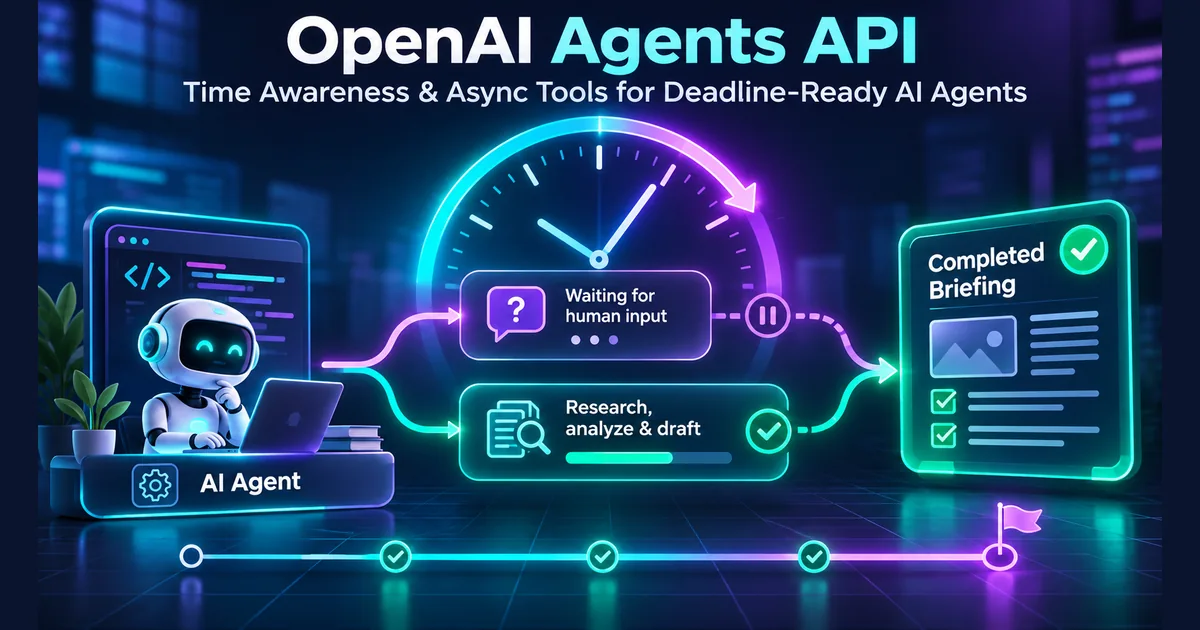
On November 20, 2026, OpenAI published a developer walkthrough of two capabilities designed for this pattern: time awareness in its Agents API and asynchronous function tools. They solve different parts of the problem. Time awareness helps a model adapt its plan to the remaining time; async tools let a model continue independent work while an application waits for a tool result or a human response.
This Rubic8 guide focuses on the developer decisions the announcement raises: API configuration, function-call correlation, Laravel queues, durable state, delivery deadlines, cancellation, safe fallbacks and security boundaries. The examples are design guidance, not a claim that an unattended agent can guarantee deadline compliance.
What OpenAI actually announced on November 20
OpenAI's article, Time awareness and async input for personal agents, uses meeting preparation to show how an agent can ask for a missing detail without freezing the rest of the task. Its Agents API example enables experimental.time_awareness, uses live web search and defines a function named request_user_input_async with async: true.
The distinction matters: request_user_input_async is an application-defined function, not a built-in service that automatically contacts a user. Your frontend, Telegram integration, mobile app or backend must show the question, receive the reply and return the result to the agent. Similarly, asynchronous tool calls do not provision worker processes or automatically manage your job queue.
The configuration is part of an evolving API. Check the current Agents API reference and your project access before deploying. Time awareness is explicitly marked experimental.
Two problems, two features
| Capability | What it helps with | What it does not do |
|---|---|---|
| Time awareness | Supplies periodic time context so the agent can prioritize work against a deadline | Enforce a hard service-level deadline, schedule OS jobs or guarantee delivery |
| Async function tool | Allows the model to continue independent reasoning while a tool result is pending | Execute your application code, own your worker queue or persist your tasks |
| Application scheduler and queue | Track work, retry, time out and deliver a final artifact | Decide editorial quality or user intent without your product rules |
| Approval gate | Keep consequential actions subject to explicit authorization | Guarantee that the model's content is correct |
These layers are complementary. For a reliable product, treat the model as a planning component inside a system that owns its clock, storage, permissions and delivery guarantees.
The meeting-briefing example: budget time backward
Suppose a user requests a company brief at 4:00 p.m. for a meeting at 4:15 p.m. and wants three minutes to read it. The actual delivery deadline is 4:12 p.m., not 4:15. That gives the system 12 minutes for investigation and drafting.
An illustrative schedule:
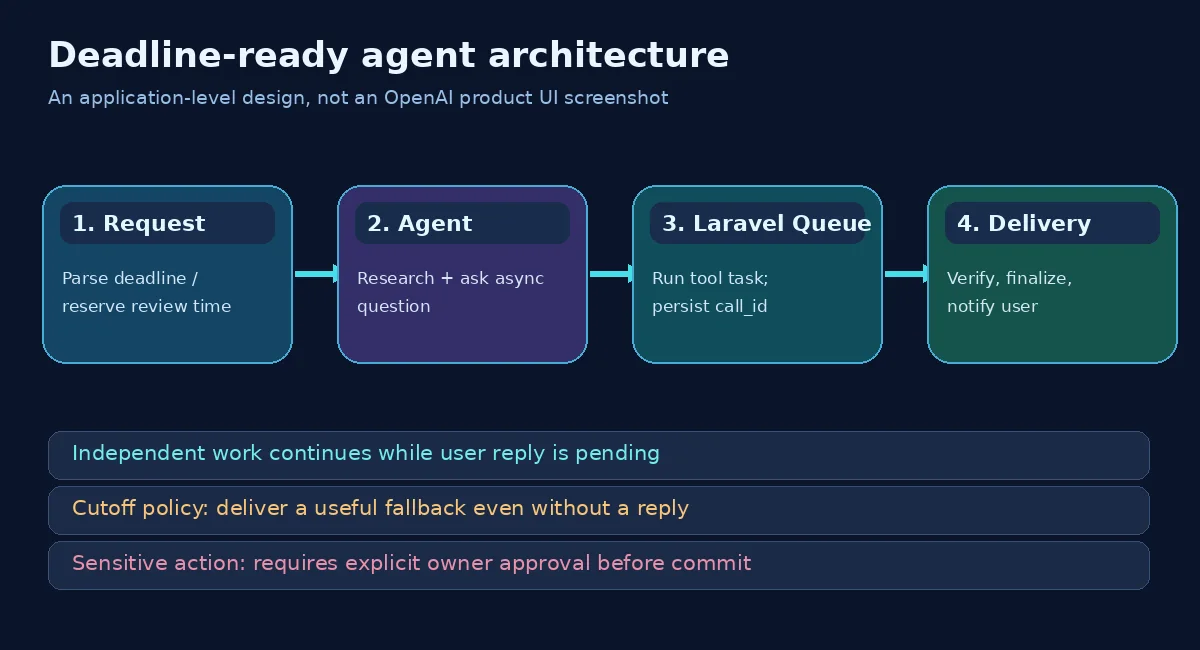
- 4:00–4:01: parse the request, persist the deadline and ask whether the meeting is technical or commercial.
- 4:01–4:07: research basic company facts and verify source dates while the user's reply is pending.
- 4:07–4:10: integrate any reply, draft a concise brief and check high-impact claims.
- 4:10–4:12: finalize, save, and deliver; stop optional research when the cutoff approaches.
These times are an editorial example, not an OpenAI benchmark. The crucial decision is to reserve delivery time before optional tasks consume it. Always store the absolute UTC deadline and original timezone; never recompute a moving deadline from a vague phrase like “in 15 minutes” on each retry.
Configure time awareness in the Agents API
OpenAI's official TypeScript example opts into time awareness during agent creation. The simplified configuration below preserves the feature shape but omits application setup and event-loop handling:
const agent = await client.beta.agents.create({
  name: "Deadline-aware research assistant",
  model: "gpt-6.2-astra",
  instructions: "Deliver a useful brief before the requested cutoff. Ask for important missing context, but continue independent work while the reply is pending. State uncertainties.",
  experimental: { time_awareness: true },
  tools: [
    { type: "web_search", mode: "live" },
    {
      type: "function",
      name: "request_user_input_async",
      async: true,
      description: "Ask the user a clarifying question and return the answer or expiration.",
      parameters: {
        type: "object",
        properties: { question: { type: "string" } },
        required: ["question"],
        additionalProperties: false
      }
    }
  ]
});
Important: the selected model, project access, API method and tool compatibility must be confirmed in the current documentation. The snippet illustrates configuration, not a complete runnable application. A backend still needs to handle session events, tools, authorization and final delivery.
Async tools: continue working without losing the call ID
OpenAI's async tool calling guide specifies that adding async: true to a function or custom tool allows the model to keep working before the result comes back. Your application still executes the call.
The exact call ID is critical. A completed job must be returned as a tool-result item associated with the original call_id. An application-specific task handle can help workers track an outstanding request, but it cannot replace the API call ID when replying to the model.
{
  "type": "function_call_output",
  "call_id": "call_original_123",
  "output": "{\"status\":\"answered\",\"answer\":\"Technical demo\"}"
}
This output item is illustrative; use the precise continuation format required by your chosen Agents API or Responses API endpoint. For a Responses API continuation, OpenAI documents passing the latest previous_response_id, the original call ID and the tool definitions/instructions as required. A late reply should not be applied to a different conversation or overwritten by a newer task.
What if the user never answers?
Return an explicit expiration/no-answer result to the agent and continue with a safe default. For example: “Meeting focus unavailable; brief covers product, latest releases and open questions.” Do not fabricate a reply or let the agent wait indefinitely. The content should state which decisions were made without the missing input.
What if the user answers after the brief was delivered?
Store the reply, mark it late, and ask the user whether to generate a revised version. Avoid silently changing a delivered artifact in place, especially when it may already have been read or shared. A versioned brief_v2 is easier to audit.
Laravel architecture: split agent orchestration from worker execution
For teams using PHP and Laravel, the integration does not require turning Laravel into an agent framework. Keep Laravel as the orchestration and delivery system; use the documented OpenAI API through a thin service layer.
An application could maintain an agent_tasks table with:
| Field | Purpose |
|---|---|
id / session_id | Local task identifier and owning agent session |
api_call_id | Original tool call to correlate the result |
kind / payload | Type of work and validated arguments |
status | queued, running, completed, expired or failed |
deadline_at | Absolute UTC cutoff for the requested deliverable |
answered_at / result | Reply or tool output, timestamped and versioned |
idempotency_key | Prevent duplicate execution or duplicate notifications |
Dispatch a job after validating the tool call
The following Laravel-style pseudocode shows where the tool correlation belongs. It is not an official OpenAI PHP SDK example and assumes you have created the table, queue job and permissions checks:
//start modify by tnt - illustrative async tool orchestration
if (! $policy->allows($user, 'ask-user-question', $session)) {
    throw new AuthorizationException();
}

DB::table('agent_tasks')->updateOrInsert(
    ['idempotency_key' => $session->id . ':' . $callId],
    [
        'session_id' => $session->id,
        'api_call_id' => $callId,
        'kind' => 'ask-user-question',
        'status' => 'queued',
        'deadline_at' => $deadlineUtc,
        'updated_at' => now(),
    ]
);

AskUserForAgentContext::dispatch($session->id, $callId);
//end by tnt
The worker sends a question through an authorized channel, stores an answer or timeout in the database, and submits a tool output referencing api_call_id. It must not blindly retry a send that already succeeded; notification delivery and message processing need idempotency too.
Use queues for durability, not just parallelism
A process can restart, a worker can crash, a Telegram callback can arrive late, or a model request can time out. Persist enough state that another worker can resume safely. Use bounded retries with backoff for transient failures, but stop retries after the delivery cutoff or once the operation is no longer valid.
Before adding concurrency, validate that one end-to-end sequence works correctly: create task, ask user, receive answer, correlate call ID, draft, deliver, and verify that the user received the expected artifact.
What changes in the Responses API?
OpenAI also describes a lower-level pattern for teams operating their own Responses API loop. The application computes the deadline once and appends a fresh time reminder before subsequent model calls, including tool-result continuations. This is application-managed time awareness; it does not require claiming that the Agents API experimental flag exists in every API.
For async tools in the Responses API, use the latest response state and return completed results with their original call_id. The OpenAI docs emphasize that an async tool response may arrive after other conversation turns, so the continuation must use the latest response ID while preserving the original tool-call mapping.
For a simple deterministic process—such as exporting a report at 8 a.m. without meaningful AI planning—a normal scheduler/queue may still be simpler and more reliable than a continuously running agent.
Compatibility and limits that are easy to miss
The current async-tool guide states that GPT-6 Astra and later support async tool calling, and that asynchronous execution applies to application-run function and custom tools, not hosted built-in tools. It also advises direct tool calling instead of configuring async tools for programmatic tool calling. In multi-agent mode, the guide warns against combining async tools with parallel tool calls.
These constraints can change. Confirm compatibility when picking a model or deploying a new architecture rather than assuming every model with tool calling can handle asynchronous tool results the same way.
Prevent the three most expensive timing failures
1. Deadline drift
Store deliver_by as a UTC instant calculated at acceptance time. Capture the user's timezone and a separate internal safety margin. Do not use a newly computed “15 minutes from now” on retries. Set independent timeouts for retrieval, worker jobs and final notification.
2. Late-result corruption
Give every async call an immutable session ID, API call ID and task version. Ignore or quarantine results from stale versions instead of merging them into an already-delivered report. Track the source and timestamp of any information obtained near the cutoff.
3. Repeated side effects
A retry must not publish two posts, send two emails, charge twice or execute the same irreversible action. Use an idempotency key, record completion atomically and keep high-impact operations behind an explicit approval gate.
Observability: measure completed tasks, not just token usage
For each run, log start time, deadline, first useful output time, final delivery time, queued/running tool durations, user-answer latency, retry count, tokens, total cost, and whether a human approved a consequential action.
Useful product metrics include:
- Deadline success rate: percentage of valid requests delivered by their stated cutoff.
- Useful fallback rate: percentage of no-reply cases that still produced a clearly qualified artifact.
- On-time, quality-passed rate: deadline success after human or automated quality checks.
- Duplicate side-effect rate: should trend toward zero for approval/publishing/payment actions.
- Time remaining at handoff: whether users received the requested review buffer.
Do not claim “99.9% reliable” based on a handful of demonstrations. Test late answers, missing answers, provider failure, queue saturation, expired sessions and user cancellation. Separate vendor-reported functionality from measurements collected on your own stack.
Security: a deadline must never override authorization
Time pressure is an attacker-friendly condition. An agent racing a deadline could take shortcuts if the host application does not enforce boundaries. A trusted implementation should not let retrieved web text change the recipient, expand tool permissions, skip validation or commit an action without authorization.
For a publishing bot, a safe sequence is research → draft → QA → explicit owner approval → publish one version. The owner approval must be enforced by the application, not merely requested in the prompt. For more on monitoring unusual agent behavior, see Rubic8’s Agent Anomaly Detection guide.
For payload inspection during development, Rubic8’s JSON Validator and JSON Formatter can help inspect test data. Never paste production secrets, private prompts or sensitive user data into an online tool.
Production rollout checklist
- Pick one narrow use case. A meeting briefing or non-sensitive report is a safer pilot than payments, account changes or publishing.
- Lock the real deadline. Record an absolute time and delivery margin before creating agent work.
- Define one async tool. Ask a question, run independent work and return the result with the original
call_id. - Persist state. Use queue-backed work with IDs, expiration, retries and deduplication.
- Write a no-answer path. Deliver a useful, transparent fallback instead of waiting forever.
- Enforce permissions server-side. Time pressure must not bypass tool authorization or owner approval.
- Simulate failures. Kill workers, delay messages, change user intent and replay callbacks.
- Measure outcomes. Track on-time delivery and validated task quality before scaling.
Frequently asked questions
Is time awareness a hard real-time scheduler?
No. It provides time context so a model can adjust its plan. Your application must still enforce timeouts, schedule jobs and deliver results. The Agents API configuration is currently experimental.
Does an async function run on OpenAI’s server?
No. Your application executes the function. Async tool calling allows the model to keep working while that result is pending; it does not create or manage your workers.
Does request_user_input_async exist automatically?
No. It is a developer-defined tool name used in OpenAI’s walkthrough. You must implement the UI, communication channel, timeout and return value.
Can I use async function calls with any OpenAI model?
No. Check current compatibility. As documented at publication time, async tool calling is available on GPT-6 Astra and later, with restrictions on hosted built-in tools and certain orchestration modes.
What happens if a user replies after delivery?
Record the late response, avoid rewriting the original result silently and offer a clearly versioned update if appropriate.
Is Laravel Queue enough without an agent framework?
For deterministic workflows, often yes. Choose an AI agent only when the task benefits from adaptive research, interpretation or planning. Keep Laravel responsible for storage, permissions, deadlines, retries and side effects.
Bottom line
OpenAI’s November 20 update makes a useful agent pattern easier to express: ask when clarification helps, continue independent work, and keep the deadline in view. But reliability still lives in the surrounding system. A real production agent needs durable job state, strict call-ID correlation, an explicit cutoff, transparent fallback behavior and human approval for consequential actions.
Build those foundations first. Then evaluate whether time awareness and async tools improve real on-time, quality-passed outcomes on your own workloads.
Official references
- OpenAI Developers: Time awareness and async input for personal agents (November 20, 2026)
- OpenAI API: Async tool calling
- OpenAI API: Create an agent, experimental time awareness
- OpenAI API: Deployment checklist
Rubic8 Editorial Team
Editorial Team
Rubic8 creates practical guides and free tools for developers, webmasters, and digital publishers. Our fast-changing technical content is reviewed against current primary documentation before publication.
